TECHTalksPro
  • Home
  • Business
    • Internet
    • Market
    • Stock
  • Parent Category
    • Child Category 1
      • Sub Child Category 1
      • Sub Child Category 2
      • Sub Child Category 3
    • Child Category 2
    • Child Category 3
    • Child Category 4
  • Featured
  • Health
    • Childcare
    • Doctors
  • Home
  • SQL Server
    • SQL Server 2012
    • SQL Server 2014
    • SQL Server 2016
  • Downloads
    • PowerShell Scripts
    • Database Scripts
  • Big Data
    • Hadoop
      • Hive
      • Pig
      • HDFS
    • MPP
  • Certifications
    • Microsoft SQL Server -70-461
    • Hadoop-HDPCD
  • Problems/Solutions
  • Interview Questions
Showing posts with label Problems&Solutions. Show all posts

Monday, October 30, 2017

How to use Password file with Sqoop

 Chitchatiq     10/30/2017 11:21:00 AM     BigData&Hadoop, Problems&Solutions, sqoop     No comments   


How to use local password-file parameter with sqoop

Problem: sometimes we have to read password from file for sqoop command.
Solution: Passing password parameter file to sqoop command is not a big deal. Just follow below steps:

1.    Create a password with Echo -n “<<password>> > <<passwordfilename>>
E.g.
Echo -n “Srinivas” > passwordfile – Here we can give file name with location

Sqoop Command:

sqoop list-tables  --connect "jdbc:mysql://sandbox.hortonworks.com:3306/hdpcdpractise" --username hadoop --password-file file:///usr/Srinivas/ passwordfile


Read More
  • Share This:  
  •  Facebook
  •  Twitter
  •  Google+
  •  Stumble
  •  Digg

Monday, October 9, 2017

SQOOP-SqlManager-Error reading from database-java.sql.SQLException-set com.mysql.jdbc.RowDataDynamic-3c2d5cfb

 Chitchatiq     10/09/2017 06:37:00 PM     Hive, Problems&Solutions, sqoop     No comments   


Problem:

sqoop export --connect "jdbc:mysql://sandbox.hortonworks.com:3306/hdpcdpractise" --username hadoop --password hadoop --table weather --export-dir /user/hortonworks/weather/  --fields-terminated-by ',';


Some times when we run sqoop commands like above we will get following error

“ERROR manager.SqlManager: Error reading from database: java.sql.SQLException: Streaming result set com.mysql.jdbc.RowDataDynamic@3c2d5cfb is still active. No statements may be issued when any streaming result sets are open and in use on a given connection. Ensure that you have called .close() on any active streaming result sets before attempting more queries.

java.sql.SQLException: Streaming result set com.mysql.jdbc.RowDataDynamic@3c2d5cfb is still active. No statements may be issued when any streaming result sets are open and in use on a given connection.”

Solution:
Simple solution would be adding driver parameter with value like below
--driver com.mysql.jdbc.Driver


sqoop export --connect "jdbc:mysql://sandbox.hortonworks.com:3306/hdpcdpractise" --username hadoop --password hadoop --table weather --export-dir /user/hortonworks/weather/  --fields-terminated-by ',' --driver com.mysql.jdbc.Driver
Read More
  • Share This:  
  •  Facebook
  •  Twitter
  •  Google+
  •  Stumble
  •  Digg

Thursday, September 21, 2017

How to create a column in a table and that should throw error when we do SELECT * or SELECT col

 Chitchatiq     9/21/2017 06:45:00 PM     Problems&Solutions     No comments   


Problem:
Create a column in a table and that should give an error if we give SELECT * or SELECT of that column

Solution:
Friends, don’t think toooooo much like how to solve this problem. Here is the simple solution that I got.

Just use any computed column and that should not have any syntactical errors but it should have logical error (E..g 1/0, 1+’srinivas’)

Sample Script:
create table #test
(id1 int,id2 int,Col1 as id1+'srinu')


select *  from #test

Here We will get
Conversion failed when converting the varchar value 'srinu' to data type int.


That’s all friends……!

Thanks for reading this article and please post a comment if you have any questions/thoughts


Read More
  • Share This:  
  •  Facebook
  •  Twitter
  •  Google+
  •  Stumble
  •  Digg

Wednesday, September 6, 2017

How to find and delete the top 100 most used files in Linux/Unix

 Chitchatiq     9/06/2017 06:15:00 PM     Problems&Solutions     No comments   


Steps to find and delete the top 100 most used files in Linux/Unix

Command to find most disk space used files:
find / -xdev -type f -size +100M -exec du -sh {} ';' | sort -rh | head -n100

Command to delete the content without removing the file
> <<filename>>
E.g.
> sample.txt
Here > is used to empty the file

Thanks for reading this article and please do subscribe to get more updates 


Read More
  • Share This:  
  •  Facebook
  •  Twitter
  •  Google+
  •  Stumble
  •  Digg

Saturday, September 2, 2017

How to Install MySQL on CentOS 7

 Chitchatiq     9/02/2017 02:43:00 PM     MySQL Installation, Problems&Solutions     No comments   


Steps to Install MySQL on Linux-CentOS 7


Step 1: Download MYSQL repositories

wget http://dev.mysql.com/get/mysql57-community-release-el7-9.noarch.rpm

Step 2: Prepare repository to install MySQL

sudo rpm -Uvh mysql57-community-release-el7-9.noarch.rpm

Step 3: Install MySQL on your server

sudo yum install mysql-server

During the installation, you will be asked to provide Y or N. Just type Y.  If you see Complete! message, then it means that Install completed successfully.


Step 4: Start the MySQL service

sudo systemctl start mysqld

Step 5: Check the service status

sudo systemctl status mysqld

Thanks for reading the article. If you feel it solves your problem, please do like,comment and share this !!!!!!!!!
Read More
  • Share This:  
  •  Facebook
  •  Twitter
  •  Google+
  •  Stumble
  •  Digg

Wednesday, August 30, 2017

Hortonworks:Service 'userhome' check failed: File does not exist: /user/admin

 Chitchatiq     8/30/2017 06:08:00 PM     BigData&Hadoop, Hadoop, Problems&Solutions     No comments   


Problem: Service 'userhome' check failed: File does not exist: /user/admin


Solution:
sudo -u hdfs hadoop fs -mkdir /user/admin

sudo -u hdfs hdfs dfs -chown -R admin:hdfs /user/admin


similar kind of issues :

service 'ats' check failed: server error
could not write file /user/admin/hive/jobs/hive-job
service 'userhome' check failed: authentication required
hadoop mkdir permission denied
failed to get cluster information associated with this view instance
java io filenotfoundexception file does not exist hdfs


Read More
  • Share This:  
  •  Facebook
  •  Twitter
  •  Google+
  •  Stumble
  •  Digg

Wednesday, July 12, 2017

How to retrive/get all the numbers from a string using SQL server

 Chitchatiq     7/12/2017 01:07:00 PM     Problems&Solutions, SQL Server     No comments   


Script for getting all the numbers from string

DECLARE @string1 varchar(100)='welcome2sql1239hello23';
DECLARE @string2 varchar(100)='',@i int=0;
WHILE @i<=LEN(@string1)
BEGIN
IF(SUBSTRING(@string1,@i,1)>='0' AND SUBSTRING(@string1,@i,1)<='9')
SET @string2=@string2+SUBSTRING(@string1,@i,1);
SET @i=@i+1;
END

SELECT @string2 AS [Numbers obtained];
Read More
  • Share This:  
  •  Facebook
  •  Twitter
  •  Google+
  •  Stumble
  •  Digg

Question: Find position of numbers in the given string

 Chitchatiq     7/12/2017 01:00:00 PM     Problems&Solutions     No comments   


Script for finding the position of numbers in the given string

DECLARE @input VARCHAR(100)='welcome2Sql376hi975';
DECLARE @output VARCHAR(100)=PATINDEX('%[0-9]%',@input);
DECLARE @position VARCHAR(100)=@output;
WHILE @output<LEN(@input)
BEGIN
SET @input=STUFF(@input,PARSE(@output AS BIGINT),1,'*');
SET @output=PATINDEX('%[0-9]%',@input);
SET @position=@position+','+@output;
END

SELECT @position AS [Positions];
Read More
  • Share This:  
  •  Facebook
  •  Twitter
  •  Google+
  •  Stumble
  •  Digg

Friday, March 10, 2017

Getting Error while accessing Hive from command line interface

 Chitchatiq     3/10/2017 01:05:00 PM     Hive, Problems&Solutions     No comments   

Some times we  see below error while launching Hive from command line.


Error:

Logging initialized using configuration in file:/etc/hive/2.5.0.0-1245/0/hive-log4j.properties

Exception in thread "main" java.lang.RuntimeException: org.apache.hadoop.security.AccessControlException: Permission denied: user=root, access=WRITE, inode="/user/root":hdfs:hdfs:drwxr-xr-x


Here issue will be you are trying to launch the Hive with non HDFS users and it might be Root account.

Below are the steps to solve the problem:

  1. Create Root or the users which is using to launch the hive
sudo -u hdfs hdfs dfs -mkdir /user/<<root>>

  1. Do the HDFS  ownership change from HDFS to the required user

sudo -u hdfs hdfs dfs -chown -R root:hdfs /user/root
Read More
  • Share This:  
  •  Facebook
  •  Twitter
  •  Google+
  •  Stumble
  •  Digg

Wednesday, February 1, 2017

SQL SERVER - Display Query and Results in a Separate tab

 Chitchatiq     2/01/2017 11:55:00 PM     Problems&Solutions, SQL Server     No comments   


 SSMS: Display Query and Results in Separate Tab

With SQL Server Management Studio (2008, 2012, 2014, 2016, or latest version) we often need to adjust the results grid to view the query results in proper way or change the SQL Server query results view.
In order to display the query and results in separate tab we have few short cuts.

Step 1:

In SSMS (sql server management studio), Go to Tool  and then click on Option


Step 2:

Under Options-> Go to Query Results -> SQL Server -> Results to Grid and then Check
Display Results in a separate tab  and Switch to results tab after the query executes Check boxes 


Step 3: Now try to run the query, You will see query and results are in separate tab.

Read More
  • Share This:  
  •  Facebook
  •  Twitter
  •  Google+
  •  Stumble
  •  Digg

Saturday, January 7, 2017

Get Row Count Of All The Tables In SQL Server Database

 Chitchatiq     1/07/2017 03:27:00 PM     Problems&Solutions, SQL Server     No comments   


Generally most of the times, People who are working as Database Developers or DBA’s will come across to Get Row Count of all the tables in Database to check if there are any table is having 0 records (Or) to Get TOP 5 huge Row Counts tables for a particular Database (Or) To compare the Row counts between Source and Target database after Backup or Data load

Most of the times naïve (Inexperienced) People will try to use create SELECT COUNT(*) FROM [Table] for each table and then they will take the Row Counts for each table.

So for e.g. if we have a Database with 200 Tables then we have to write 200 SELECT COUNT(*) statements and then need to execute those statements. Finally we have to take those results into single place that could be EXCEL or any Flat file to see the each the table row counts. To complete all these things it will take around 1 hour.

We are all known time is so precious. Why can’t we do it in 2-3 minutes of the same task by using some of the SQL SERVER system tables?   

Here we go… 

SELECT
    sc.name +'.'+ ta.name TableName, SUM(pa.rows) RowCnt
FROM
    sys.tables ta
INNER JOIN sys.partitions pa
    ON pa.OBJECT_ID = ta.OBJECT_ID
INNER JOIN sys.schemas sc
    ON ta.schema_id = sc.schema_id
WHERE ta.is_ms_shipped = 0 AND pa.index_id <2
GROUP BY sc.name,ta.name
ORDER BY  RowCnt desc

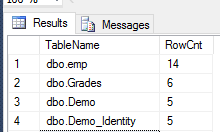
Result:
query-to-get-row-count for all tables,


Tags: sql query to get row count for all tables, count number of rows in each table, count number of rows in each table


Read More
  • Share This:  
  •  Facebook
  •  Twitter
  •  Google+
  •  Stumble
  •  Digg

Monday, January 2, 2017

How to Fix ERROR: CANNOT PARALLELIZE AN UPDATE STATEMENT THAT UPDATES THE DISTRIBUTION COLUMNS Printable View

 Chitchatiq     1/02/2017 08:47:00 PM     Problems&Solutions, SQL Server     No comments   


Error: [DataDirect][ODBC Greenplum Wire Protocol driver][Greenplum]ERROR: Cannot parallelize an UPDATE statement that updates the distribution columns(File cdbmutate.c;Line 709;Routine apply_motion;)

[DataDirect][ODBC Greenplum Wire Protocol driver][Greenplum]ERROR: Cannot parallelize an UPDATE statement that updates the distribution columns
Cause: 
When Executing UPDATE Statement on Distribution Key we will see above errors. 

Solution:
As Greenplum will not allow to make Updates on Distribution Key. We have to update the logic to get  the required values through SELECT


Read More
  • Share This:  
  •  Facebook
  •  Twitter
  •  Google+
  •  Stumble
  •  Digg

Monday, December 19, 2016

Error: Service 'userhome' check failed: java.io.FileNotFoundException: File does not exist: /user/admin

 Chitchatiq     12/19/2016 04:51:00 PM     Problems&Solutions, Service 'userhome', Service 'userhome' check failed: java.io.FileNotFoundException, SQL Server     No comments   

Error: Service 'userhome' check failed: java.io.FileNotFoundException: File does not exist: /user/admin


Resolution:


Create Admin account under HDFS user folder using below command


sudo -u hdfs hadoop fs -mkdir /user/admin


Read More
  • Share This:  
  •  Facebook
  •  Twitter
  •  Google+
  •  Stumble
  •  Digg

Thursday, August 11, 2016

FAILED: SemanticException [Error 10294]: Attempt to do update or delete using transaction manager that does not support these operations.

 Chitchatiq     8/11/2016 04:16:00 PM     Error 10294, Problems&Solutions, SQL Server, transaction manager     No comments   


Error:


Resolution:
        1.     Check if Your table storage format is ORC
        2.     Check if your table is partitioned and bucketed, if not do partition and bucket
        3.     Check all the below configurations from ambari or Hive_site.xml
hive.support.concurrency – true
 hive.enforce.bucketing – true
 hive.exec.dynamic.partition.mode – nonstrict
 hive.txn.manager –org.apache.hadoop.hive.ql.lockmgr.DbTxnManager
 hive.compactor.initiator.on – true
 hive.compactor.worker.threads – 1


4.     After that try to update the records
Read More
  • Share This:  
  •  Facebook
  •  Twitter
  •  Google+
  •  Stumble
  •  Digg

Error: Failed with exception Unable to move source hdfs: to destination dfs://hadoop1.dev.com/apps/ FAILED: Execution Error, return code 1 from org.apache.hadoop.hive.ql.exec.MoveTask

 Chitchatiq     8/11/2016 03:55:00 PM     Hadoop, org.apache.hadoop.hive.ql.exec.MoveTask, Problems&Solutions, return code 1, SQL Server     No comments   


 Failed with exception Unable to move source hdf

Resolution:
1.    Generally Move task will move the files from source location to destination location. If the user doesn’t have access to source path then it will throw above error
2.    First check that whether current executing user has execute/write permission on source folder. If not provide by using chmod command
3.    Additionally check below parameter from Ambari or Hive_site.xml file
          hive.metastore.client.setugi=true and hive.metastore.server.setugi=true. 
Read More
  • Share This:  
  •  Facebook
  •  Twitter
  •  Google+
  •  Stumble
  •  Digg
Older Posts Home

Popular Posts

  • Get Row Count Of All The Tables In SQL Server Database
    Generally most of the times, People who are working as Database Developers or DBA’s will come across to  Get Row Count of all the tables...
  • How to Identify a SQL Server Express Instance
    Scenario: Some times we want to know the current SQL Server Instance and for this use below simple query to get the result SELECT...
  • Greenplum Best Practises
    Best Practices: A distribution key should not have more than 2 columns, recommended is 1 column. While modeling a database,...
  • Getting Error while accessing Hive from command line interface
    Some times we  see below error while launching Hive from command line. Error: Logging initialized using configuration in file:/et...
  • How to use Password file with Sqoop
    How to use local password-file parameter with sqoop Problem: sometimes we have to read password from file for sqoop command. Solut...

Facebook

Categories

Best Practices (1) Big Data (5) BigData&Hadoop (6) DAG (1) Error 10294 (1) external tables (1) File Formats in Hive (1) Greenplum (3) Hadoop (5) Hadoop Commands (1) Hive (4) Internal tables (1) interview Questions (1) Managed tables (1) MySQL Installation (1) ORCFILE (1) org.apache.hadoop.hive.ql.exec.MoveTask (1) Powershell (1) Problems&Solutions (15) RCFILE (1) return code 1 (1) SEQUENCEFILE (1) Service 'userhome' (1) Service 'userhome' check failed: java.io.FileNotFoundException (1) SQL Server (27) sqoop (2) SSIS (1) TEXTFILE (1) Tez (1) transaction manager (1) Views (1) What is Hadoop (1)

Blog Archive

  • December (1)
  • November (1)
  • October (2)
  • September (6)
  • August (1)
  • July (3)
  • March (1)
  • February (8)
  • January (4)
  • December (9)
  • August (4)
  • July (1)

Popular Tags

  • Best Practices
  • Big Data
  • BigData&Hadoop
  • DAG
  • Error 10294
  • external tables
  • File Formats in Hive
  • Greenplum
  • Hadoop
  • Hadoop Commands
  • Hive
  • Internal tables
  • interview Questions
  • Managed tables
  • MySQL Installation
  • ORCFILE
  • org.apache.hadoop.hive.ql.exec.MoveTask
  • Powershell
  • Problems&Solutions
  • RCFILE
  • return code 1
  • SEQUENCEFILE
  • Service 'userhome'
  • Service 'userhome' check failed: java.io.FileNotFoundException
  • SQL Server
  • sqoop
  • SSIS
  • TEXTFILE
  • Tez
  • transaction manager
  • Views
  • What is Hadoop

Featured Post

TOP 100 SQL SERVER INTERVIEW QUESTIONS

SQL SERVER INTERVIEW QUESTIONS 1.       What is the Complex task that you handled in your project 2.       What are the diffe...

Pages

  • Home
  • SQL SERVER
  • Greenplum
  • Hadoop Tutorials
  • Contact US
  • Disclaimer
  • Privacy Policy

Popular Posts

  • Greenplum Best Practises
    Best Practices: A distribution key should not have more than 2 columns, recommended is 1 column. While modeling a database,...
  • Greenplum Architecture
    Parallel Processing:  Taking all the rows from table and spreading them among many parallel processing units. In greenplum these...

Copyright © TECHTalksPro
Designed by Vasu